Live Polling Updates
Accurate Voter Survey
Data Protection
User-Friendly Interface
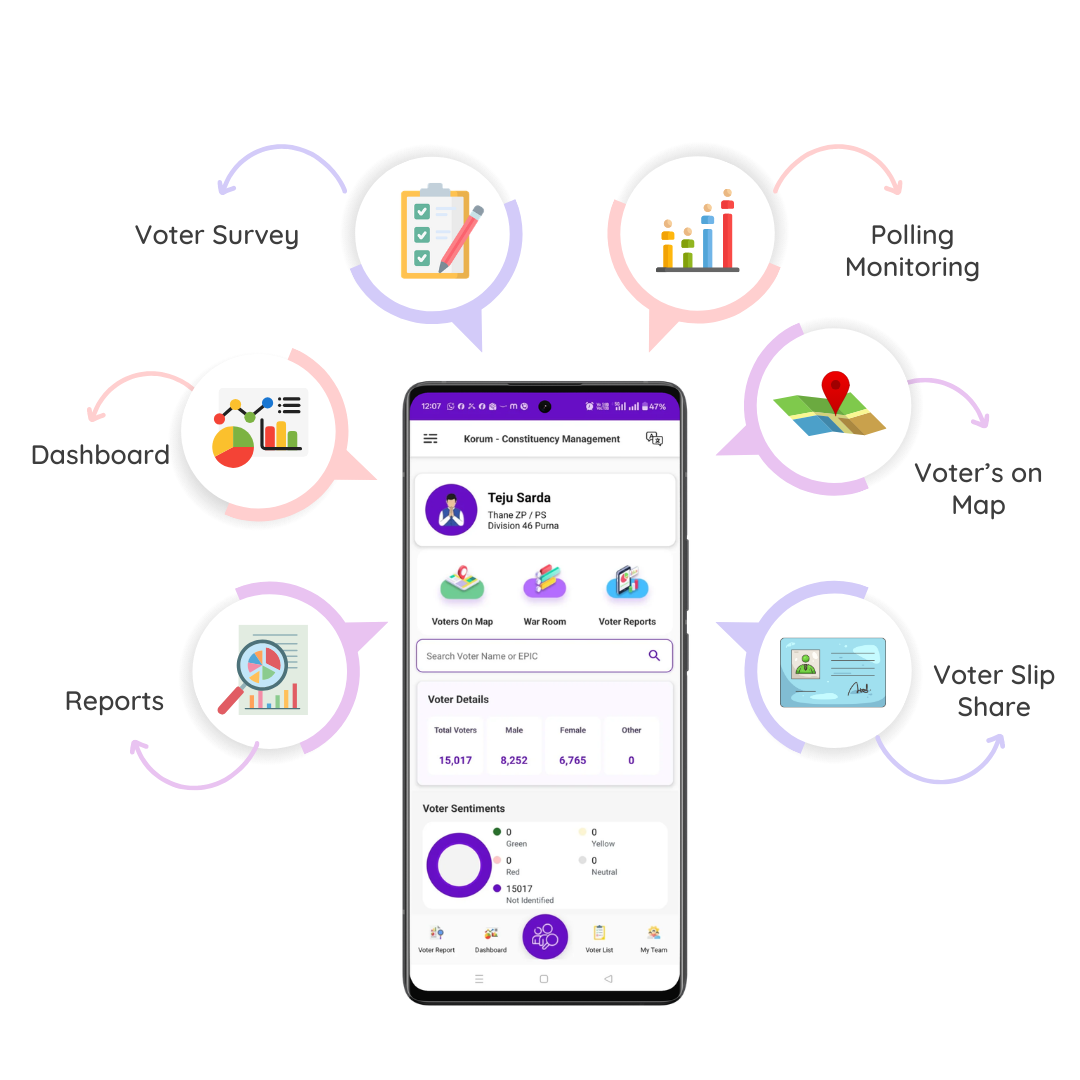
Smart voter management powered with Advanced
Voter Search, AI Contact Mapping, live War Room monitoring, Bluetooth voter slip printing,
and real-time sentiment tracking. Stay election-ready with booth analytics, polling day
control, detailed reports, and secure cloud access all in one powerful Election Management
App.

View all your supporters, including surveyed
voters, on an advanced interactive map with Korum App. Track supporter
distribution booth-wise and area-wise across your ward or constituency in real
time. Monitor voter sentiment, field progress, and team activity from one
centralised dashboard to make faster, data-driven decisions and manage
follow-ups more effectively.
View
surveyed voters and supporters with
colour-coded sentiment on the map
Navigate and reach voters easily with
location-based tracking
Get instant
booth-wise insights into supporter strength and trends
Plan visits and
follow-ups efficiently with real-time updates
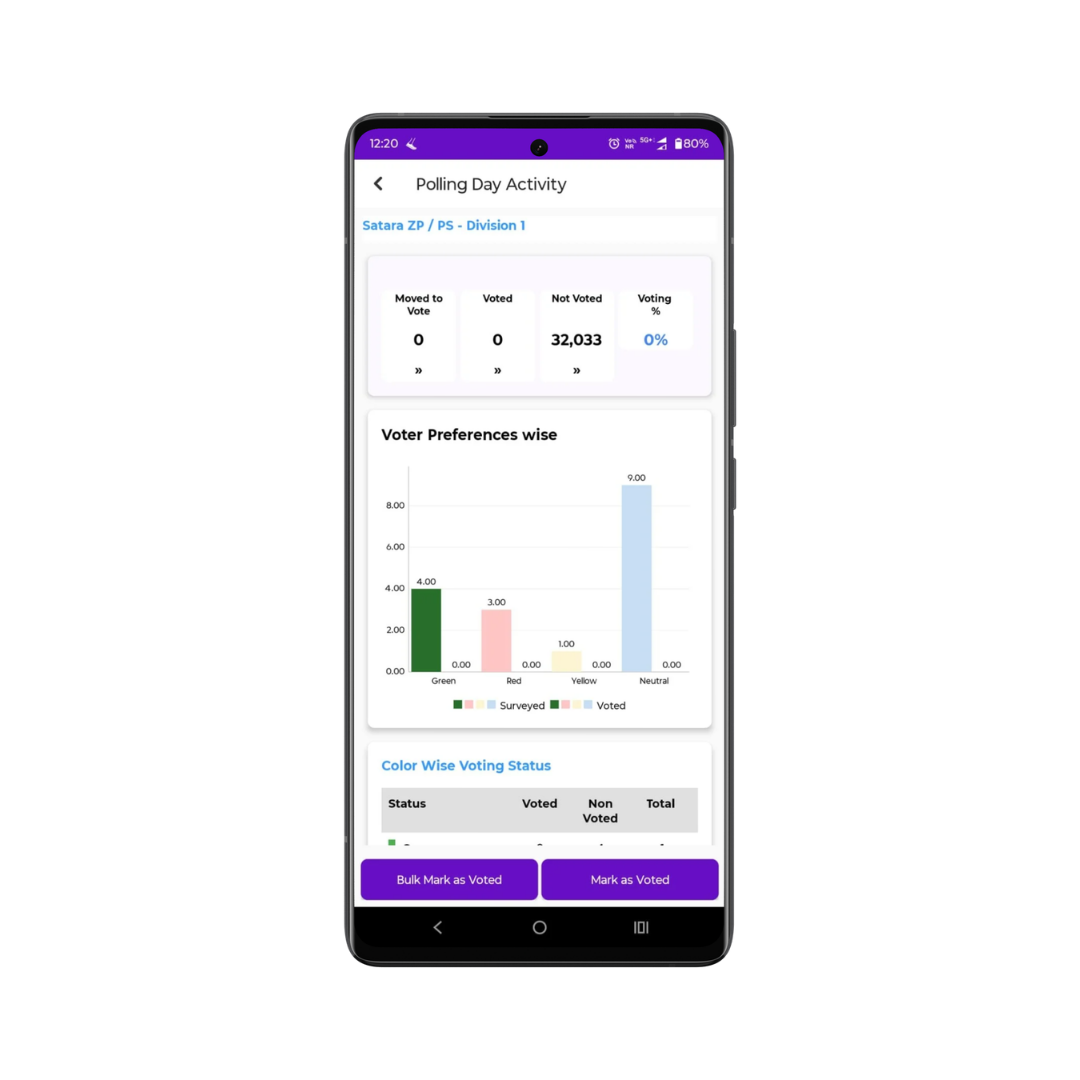
Track live voter turnout and polling activity with
Korum App, India’s leading Election Management App. Know exactly who has voted,
assign booth agents instantly, and boost voter participation with real-time
updates. Get booth-wise turnout insights and live trends to manage your election
campaign more effectively.
Monitor in real time which voters have voted and who are pending.
Assign and manage
booth agents instantly for better turnout control.
Send quick
reminders to voters who have not yet voted.
Get instant booth-level turnout updates and
live trend insights.
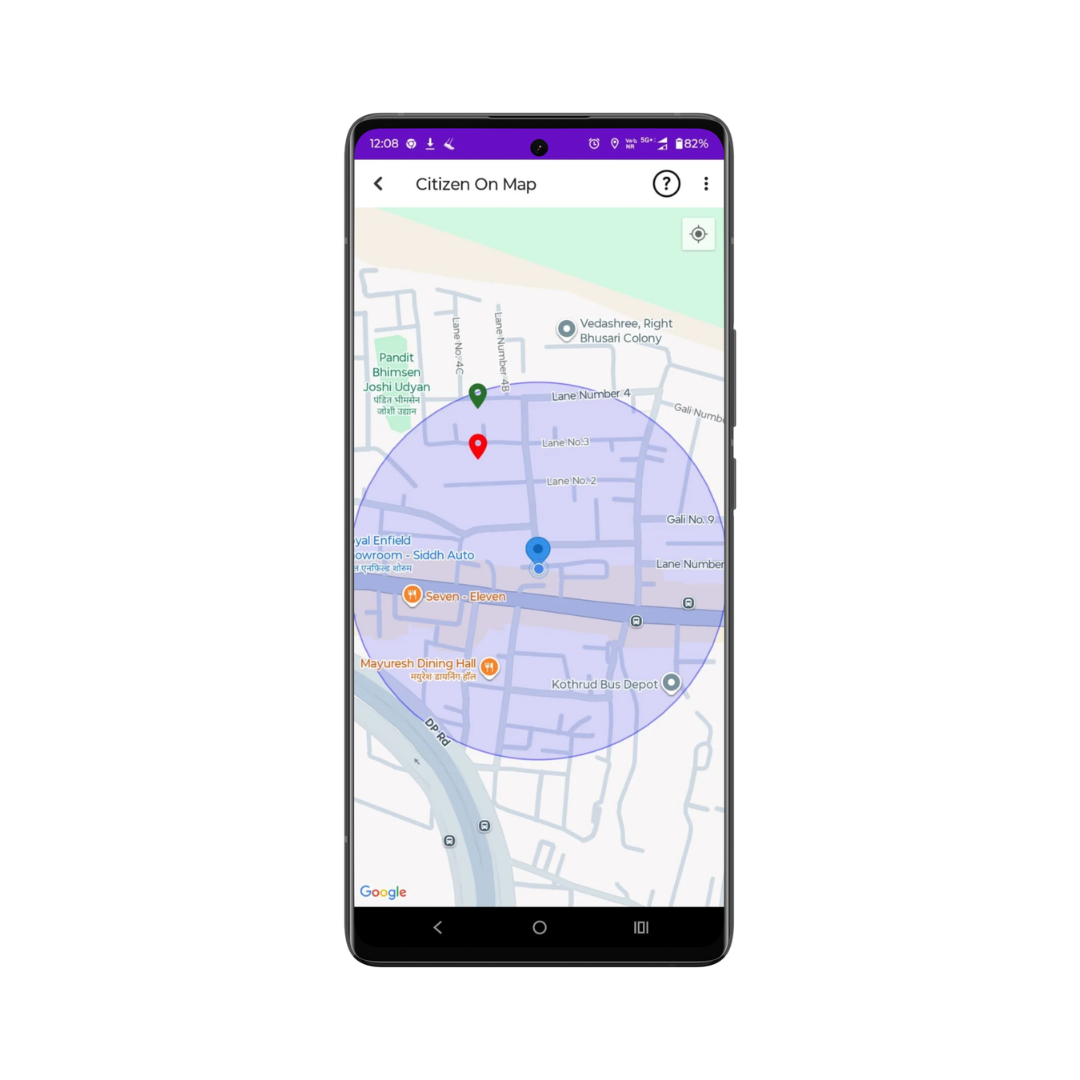
Visualise your complete voter base with Korum App,
India’s trusted Election Management App integrated with Google Maps technology.
View, filter, and analyse voters area-wise or zone-wise to plan targeted field
visits and faster follow-ups. Strengthen team coordination and improve
ground-level execution with accurate, real-time voter location
mapping.
View
all voter locations captured during detailed surveys.
Identify nearby
voters instantly for quick and efficient follow-ups.
Filter and
navigate voters easily based on area, zone, or booth.
Improve on-ground
coordination and route planning with live mapping.
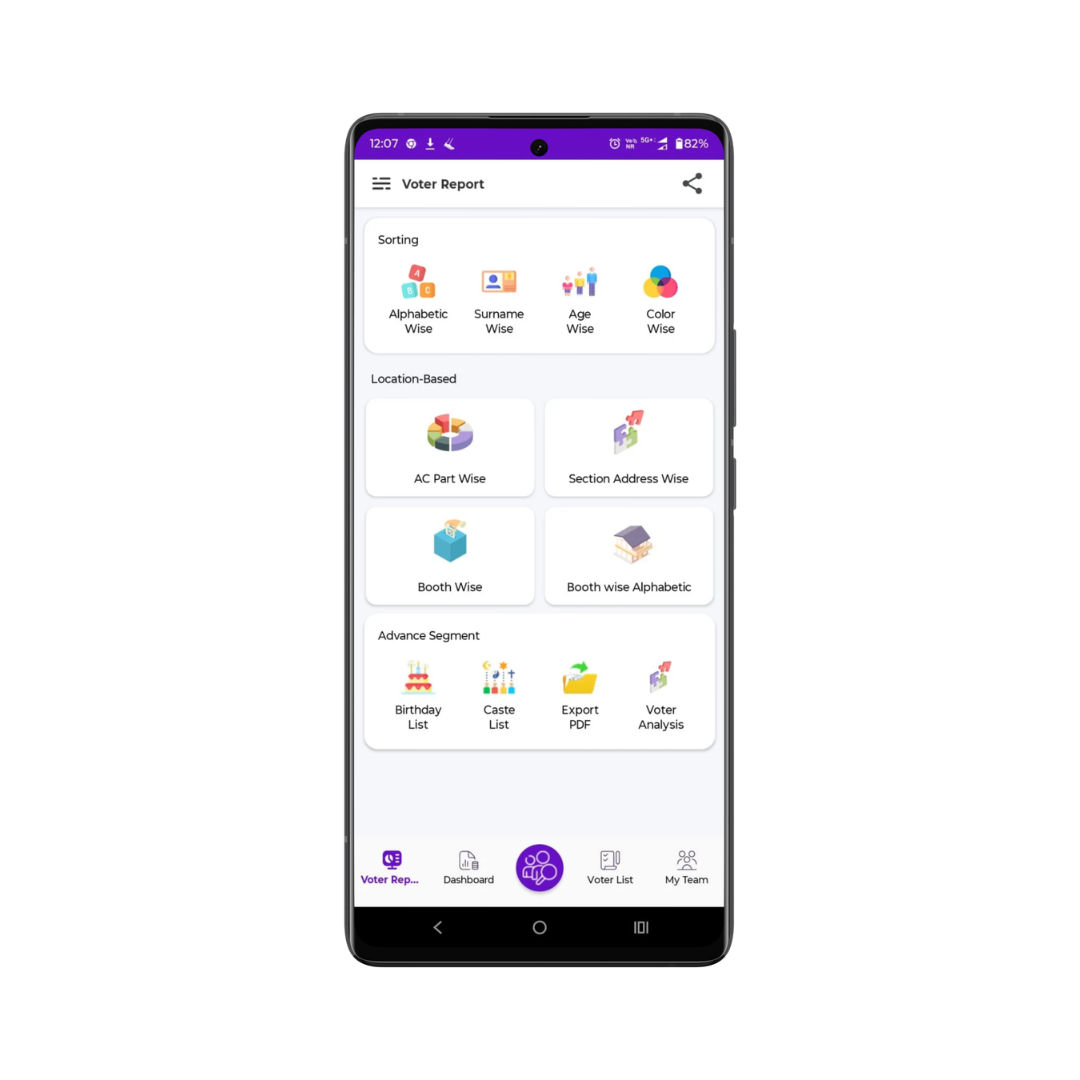
Generate detailed analytical reports with Korum App,
the smart Election Management App designed for data-driven campaigns. Analyse
voters by gender, category, age group, and support type to identify strengths,
gaps, and winning opportunities. Access booth-wise summaries, track trends, and
export reports instantly for faster, strategic decision-making.
View voters segmented
by gender, support type, category, or age group.
Identify strong
supporters, doubtful voters, and opposition clusters clearly.
Get quick booth-wise or area-wise summaries with trend insights.
Export detailed Excel
reports instantly for analysis or team sharing.
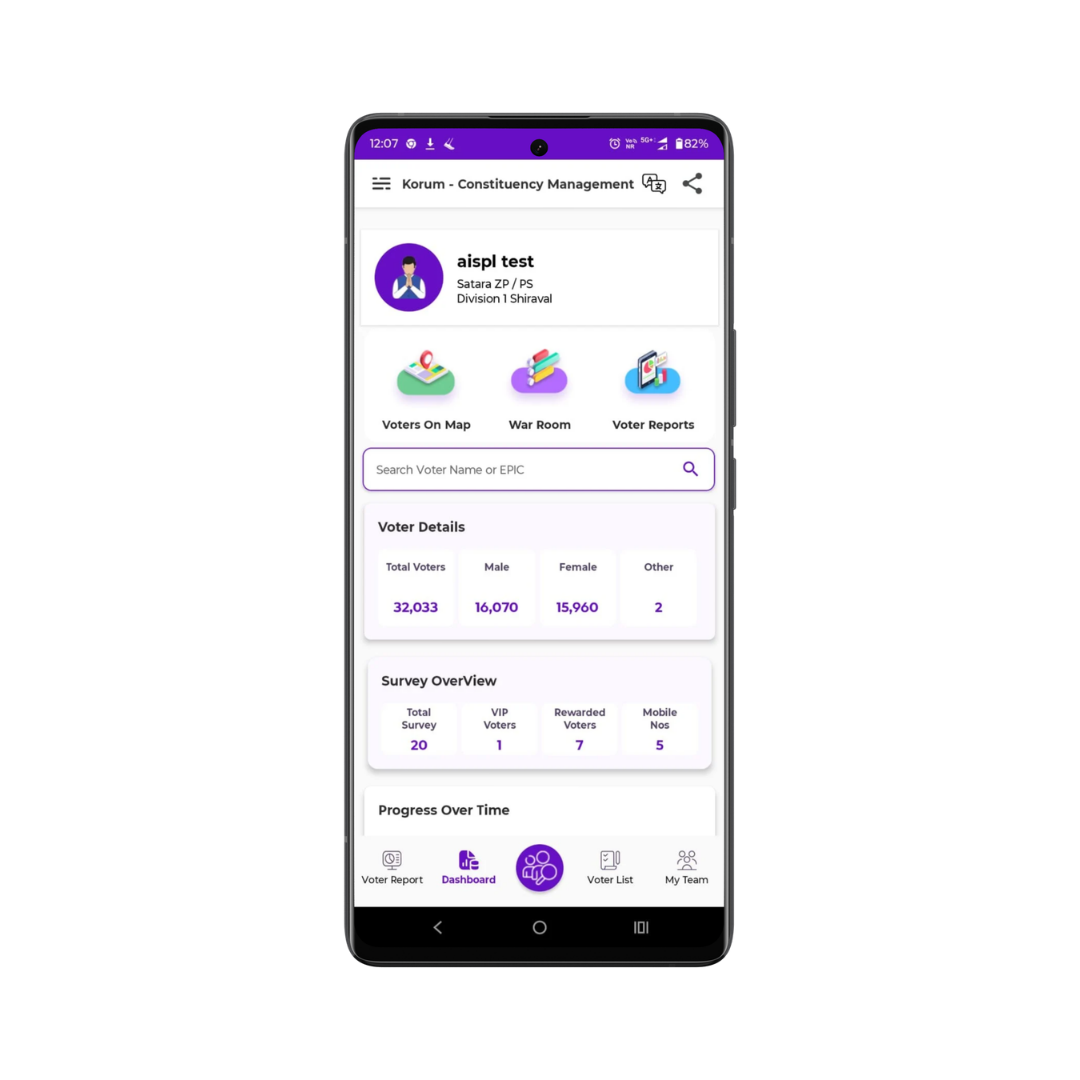
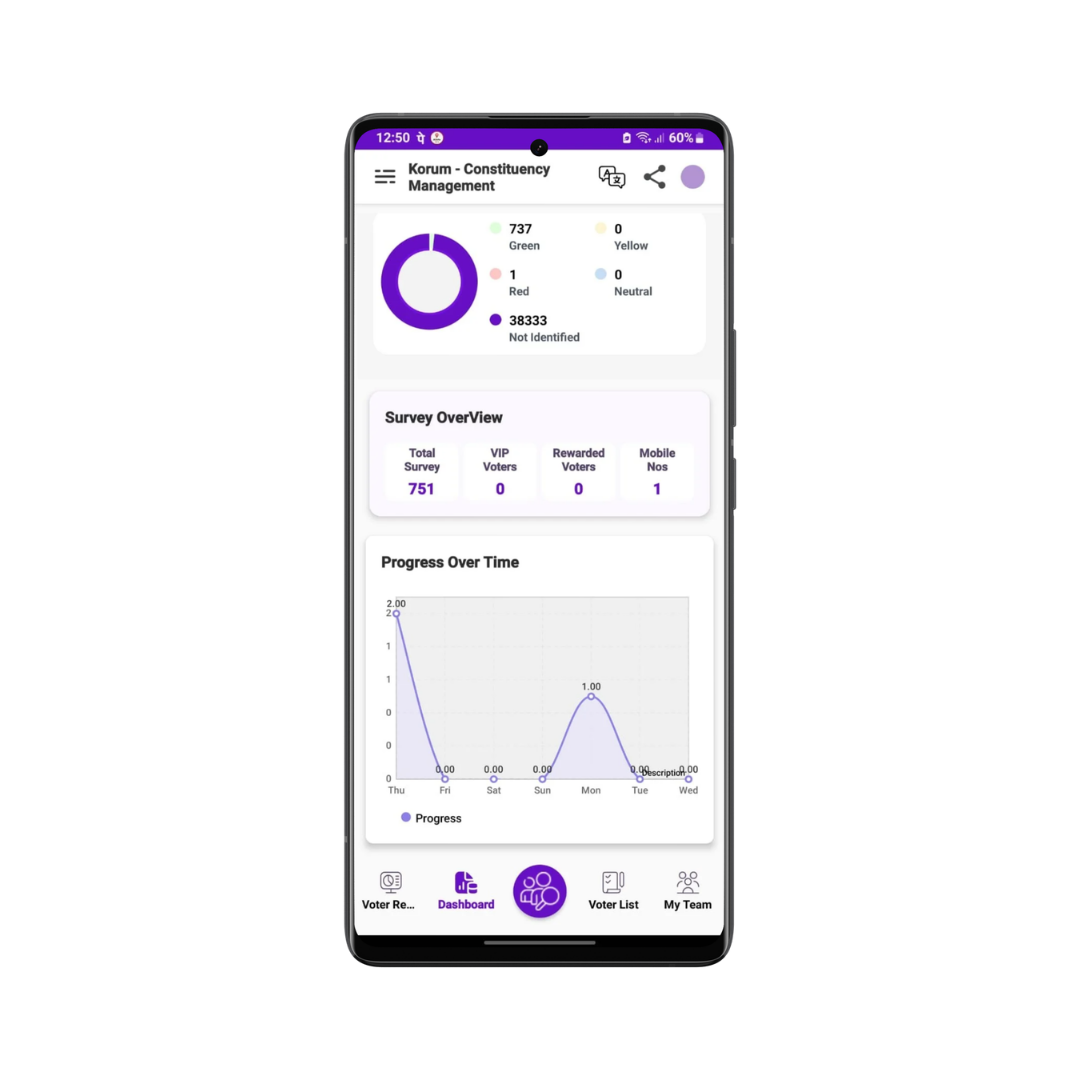
Get a complete overview of your campaign on a
single screen with Korum App, India’s advanced Election Management App. View
total voters segmented by gender, support type, and booth strength to measure
actual campaign performance. Compare area-wise progress, track growth patterns,
and make fast, data-driven decisions to improve election outcomes.
See total voters
clearly segmented by gender and support type.
Review booth-wise or ward-wise voter strength
instantly.
Compare
performance and supporter growth between different areas.
Make quick, data-driven campaign decisions with real-time insights.
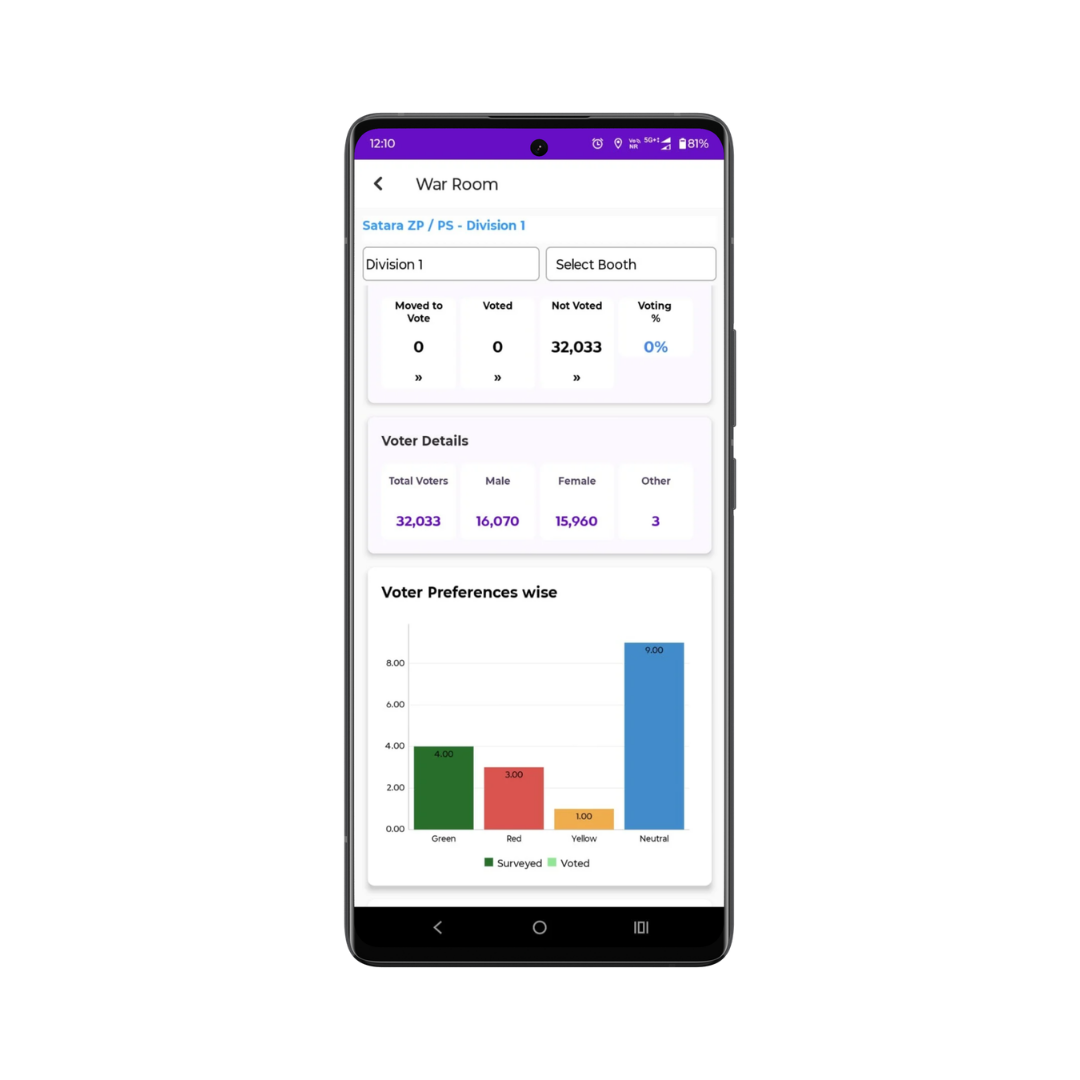
The War Room delivers a complete booth-wise voting
summary in real time from one centralised control centre. Monitor live voting
progress, track how many supporters have voted or are still pending, and receive
instant updates from ground workers. Make fast, data-driven decisions during
polling hours and efficiently manage supporter rewards with full
transparency.
Track in real time how many supporters have voted versus those remaining.
Get accurate
booth-wise voting estimates for targeted supporters.
Easily manage, record, and monitor rewards distributed to supporters.
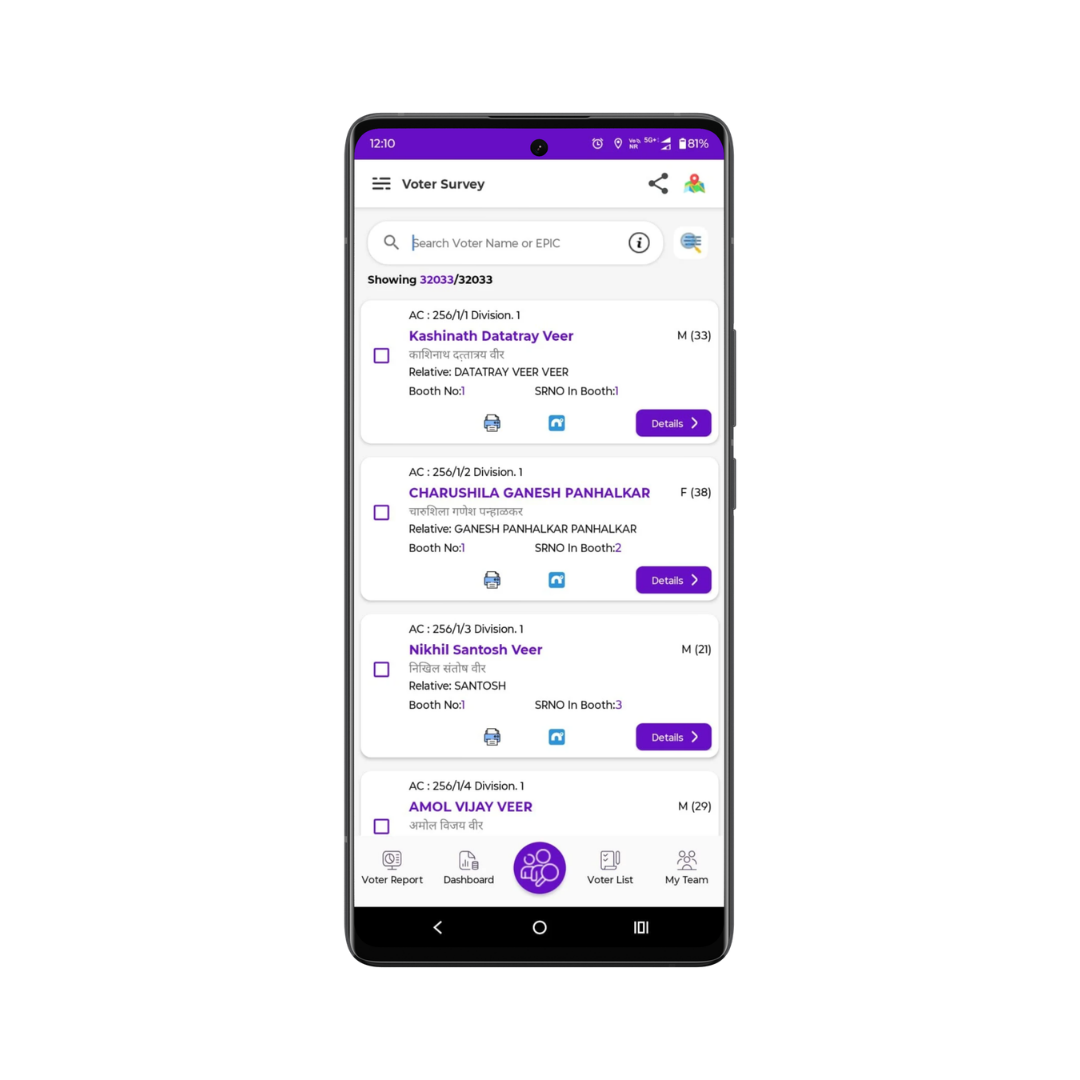
Finding voters is faster and smarter with Korum’s
centralised and advanced voter search system. Search and access complete voter
details across the entire ward within seconds using name, surname, EPIC number,
or mobile number. Connect instantly through built-in call, WhatsApp, and
messaging tools, and share voter information or campaign updates seamlessly
without switching apps.
Call,
WhatsApp, or send voter details via text
directly from the app.
Share booth
slips along with your campaign
banner instantly.
Communicate and coordinate without switching between multiple apps.
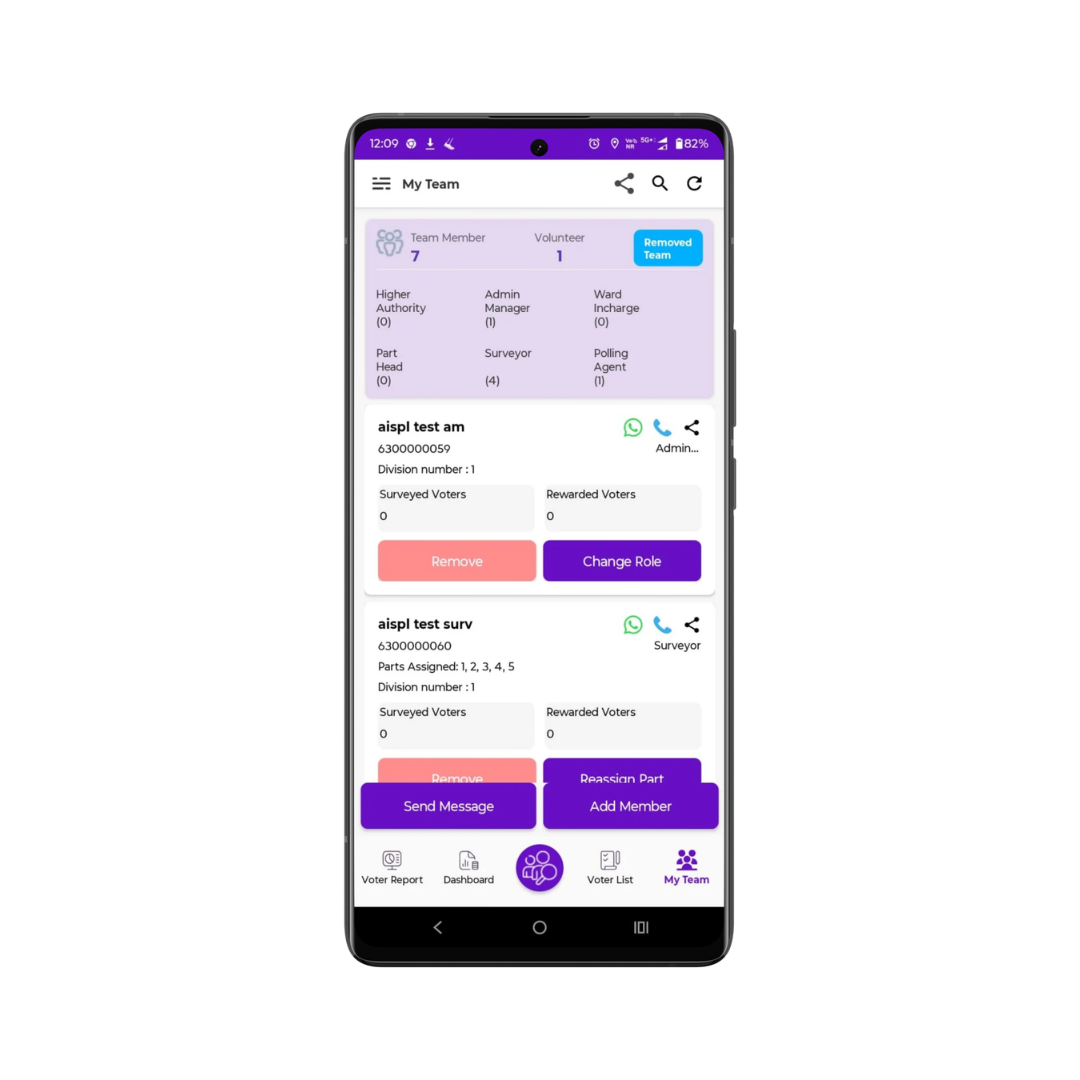
Manage your campaign team effortlessly with complete
visibility and centralised control. Track the entire team hierarchy in real time
from a single platform, from candidate level to booth worker. Stay connected
with every member, assign roles clearly, and monitor responsibilities to improve
coordination, accountability, and smooth execution across your
campaign.
View
the complete team hierarchy under every role directly at the candidate
level.
Call or
WhatsApp any added team member instantly from within the app.
Strengthen coordination and execution with centralised team management and
role-based access
With the Voter Slip Share feature, generate and
share booth-wise voter slips instantly in an organised PDF format. Each PDF
includes a structured official header with ward name, booth number, booth name,
polling date, and election details. Create separate PDFs for each booth to
manage voter information efficiently and ensure smooth coordination at the booth
level on polling day.
Booth-wise Voter Slip Generation:
Create a separate PDF for each booth containing complete voter details of that
booth in a single, well-organised document.
PDF with Official Header:
Each PDF displays ward name, booth number, booth name, polling date, and
Assembly/Municipal information in a clear header format, making the slip more
professional and easy to read.

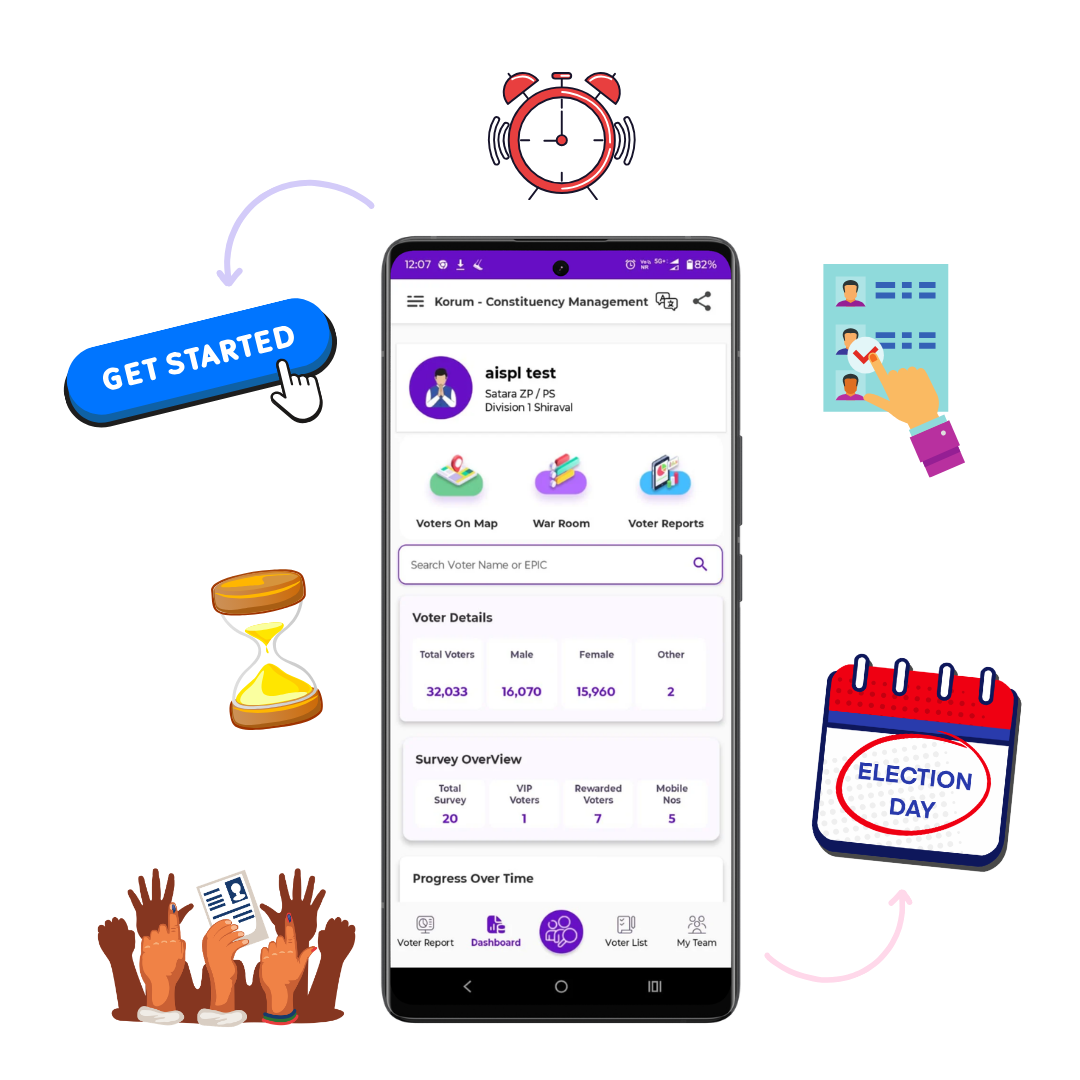
Manage
your constituency in real time with Korum, the trusted all-in-one Election
Management App.
Plan smarter, track booth performance, analyse reports, and execute your campaign
with data-driven precision.
Download Now
Korum is a powerful and secure voter management solution designed to help political teams manage constituencies with precision. From voter analysis and booth tracking to polling day monitoring and team coordination, Korum simplifies complex campaign operations and transforms them into structured, data-driven actions. With real-time insights, advanced analytics, AI-powered features, and strong data protection, Korum enables leaders to focus on strategy while the system handles execution efficiency.
Download NowWe believe in open communication and honest operations. Transparency is the foundation of Korum.
Our dedicated support team is always ready to help you. We ensure a seamless experience.
Your data security is our top priority. We use advanced encryption protocols to protect your information.
Navigate easily with a clean, intuitive interface that helps you manage your tasks quickly.
Empower your campaign with real-time insights, transparent operations, and advanced secure voter management, all in one powerful Election Management App. Save valuable time, streamline coordination, improve booth-level execution, and lead your team confidently with intelligent, data-driven tools built for winning campaigns.
Download Now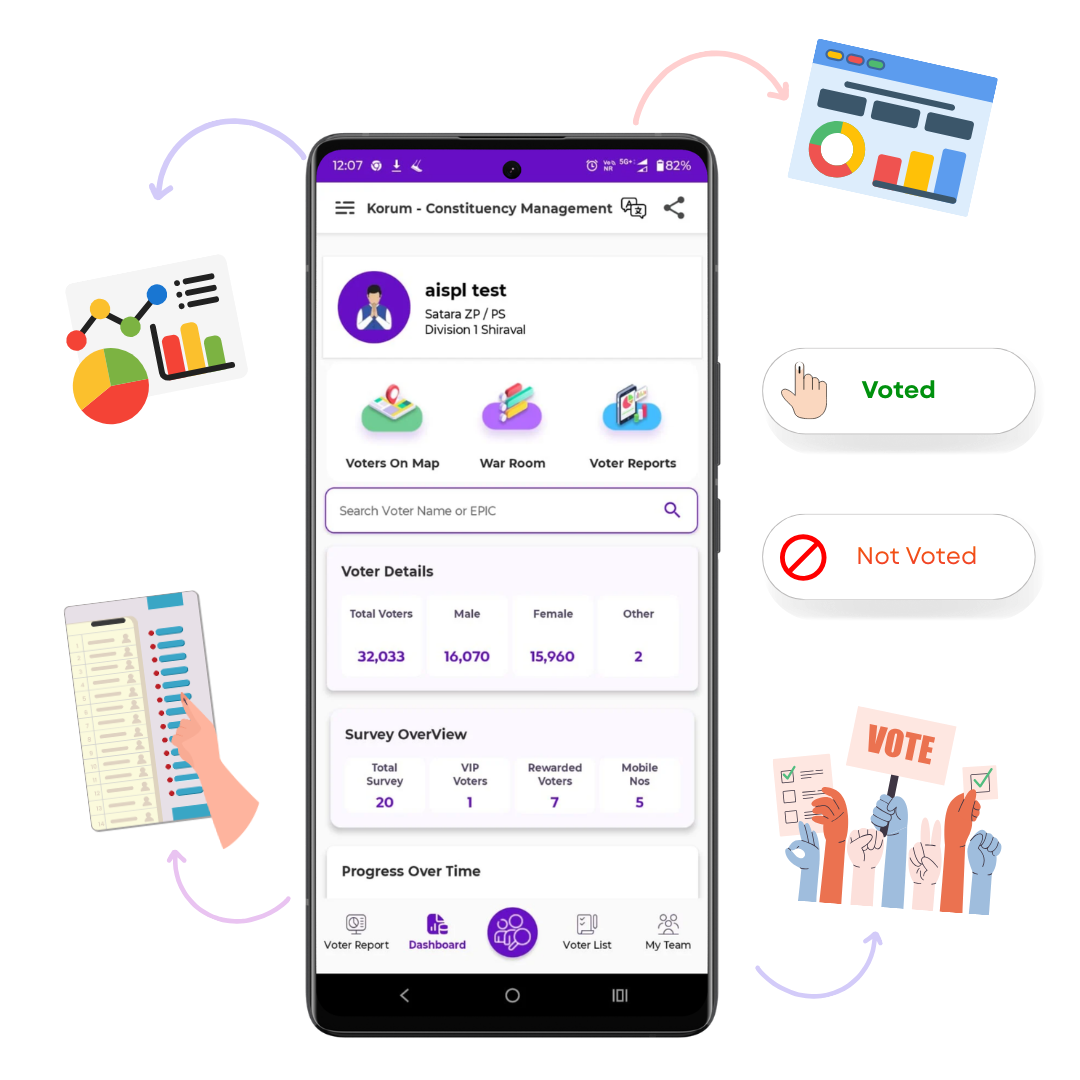
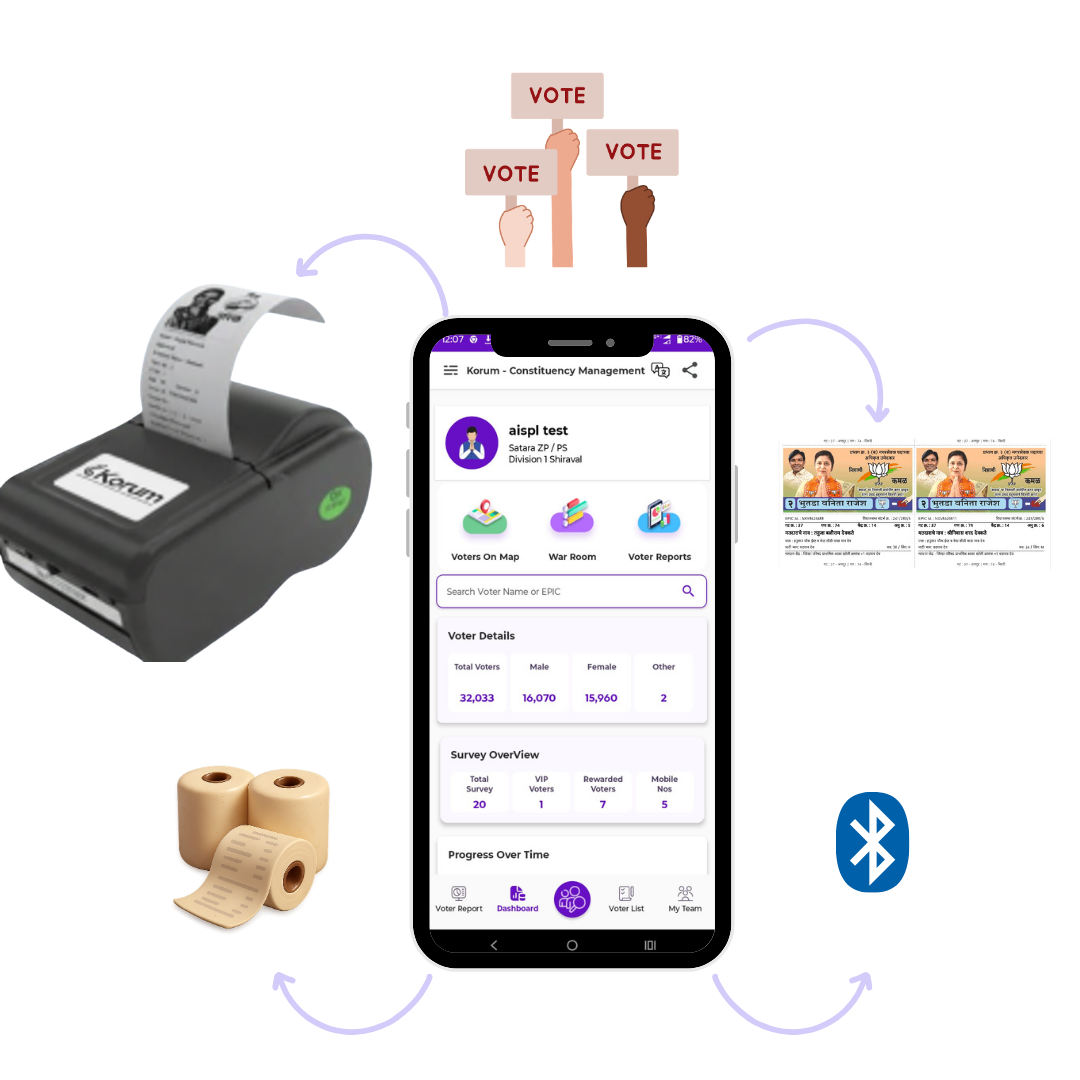
Print booth-wise voter slips instantly
by connecting a Bluetooth printer directly to the Korum App. Generate slips with
your candidate name, election symbol, and complete voter details within seconds.
Save time, reduce manual effort, and streamline last-minute booth management with
fast and reliable slip printing.
Wireless instant slip printing
Booth-wise structured
voter slips
Fast and
efficient polling-day support
Download
Now
Explore more products designed with the same quality and care.


Report Title: Analysis of the Search Operator inurl:view index shtml and the Security Implications of Insecure Web Cameras
Executive Summary
The search query inurl:view index shtml is a classic example of a "Google dork"—a specialized search string used to identify specific vulnerabilities or configurations on the internet. While often associated with "better" or more advanced search results in the context of finding unsecured devices, it highlights a significant security oversight in the deployment of IP-based surveillance cameras. This report analyzes the technical architecture behind this query, explains why it yields results involving live camera feeds, and discusses the critical security risks associated with exposed surveillance infrastructure. It further explores the evolution of these systems and the necessary mitigation strategies for network administrators.
1. Introduction
In the early expansion of the "Internet of Things" (IoT), network-connected cameras were frequently deployed with default configurations. A specific subset of these devices, often running embedded Linux systems with lightweight web servers (such as Boa or thttpd), utilized Server Side Includes (SSI) to render web interfaces.
The search query inurl:view index shtml targets these specific devices. Users employing this query are often seeking unfiltered access to live camera streams, bypassing authentication or landing pages. The "24" often appended to the query typically refers to specific hardware revisions, port designations (such as port 24), or simply a variable passed to the script to control frame rates or resolution.
2. Technical Breakdown of the Query
To understand why this query works, one must deconstruct its components:
inurl: : This is a Google search operator that restricts results to documents containing the specified text in the URL. It is a precision tool used to bypass generic content and target the file structure of a website.view : This is a common directory name or script parameter used by webcam interface software. It implies the functionality of viewing a stream.index : This usually refers to the index.shtml file, the default landing page for that specific directory.shtml : This is the critical file extension. It stands for Server Side Includes (SSI) HTML. Unlike a standard .html file, an .shtml file is parsed by the server before being sent to the user. It allows the server to inject dynamic content—such as the current time, file sizes, or in this case, a live video feed—into a standard HTML page.3. The Architecture of Vulnerable Devices
The devices most commonly indexed by this dork are typically older IP cameras running specific firmware.
Boa web server, a lightweight, single-tasking HTTP server suitable for embedded systems with limited RAM and CPU resources..shtml files to execute simple commands. For example, a file named view.shtml might contain a directive to execute a shell command that captures a frame from the camera sensor and outputs it as a binary stream to the HTML <img> tag.view or image directories are unsecured, the index.shtml file is accessible to any external entity that queries the specific URL.4. The "Better" Context: Why the Query is Popular
The term "better" in the context of this search query is subjective to the user but generally implies finding feeds that are:
shtml extension ensures the page is dynamic; it isn't a cached or dead link.Users performing this search are effectively engaging in "passive reconnaissance." They are not hacking the device (in most cases); they are simply accessing a webpage that the device owner has inadvertently left open to the public internet.
5. Security Risks and Ethical Implications
While discovering these feeds may seem benign, it poses severe security risks to the device owners and, occasionally, the viewers.
6. Mitigation Strategies for Network Administrators
To prevent devices from appearing in inurl:view index shtml search results, administrators must adhere to strict IoT security protocols:
robots.txt file can tell legitimate search engines (like Google) to ignore specific directories, preventing the devices from being indexed in the first place.7. Conclusion
The search query inurl:view index shtml serves as a stark reminder of the security debt accumulated during the early rush of IoT adoption. It exploits a specific configuration of embedded web servers that utilize Server Side Includes. While users may search for this looking for "better" access to public feeds, the results highlight a critical failure in network hygiene. The continued existence of these open feeds underscores the need for better consumer education on IoT security and a shift toward "secure by design" manufacturing principles.
The search term "inurl:view/index.shtml" is a common "Google Dork" used to find live web interface portals for network cameras, specifically those manufactured by Axis Communications. What is this Feature?
This specific URL pattern points to the default landing page of Axis network video servers and cameras. Adding qualifiers like 24 or better typically refines these searches to find specific high-quality configurations or specific frame rates.
inurl:view/index.shtml: This dork filters results to find pages that include this exact file path in the URL, which is the standard directory for Axis live view interfaces.
24: Often refers to a 24 fps (frames per second) setting, which is considered a cinematic standard and a common target for high-quality video streaming.
better: This is a keyword users add to filter for "better" image quality, often aiming for 24MP (megapixels) resolution or "True WDR" (Wide Dynamic Range) settings which handle complex lighting better than standard digital processing. Key Specifications of High-Quality (24+) Feeds
When users look for "better" camera feeds, they are typically seeking systems with the following capabilities:
24MP Resolution: Captures roughly 24 million pixels (typically 6000 x 4000), allowing for extreme detail like facial recognition and license plate identification at a distance.
True WDR (120dB+): Hardware-level Wide Dynamic Range that prevents "blown out" highlights or "crushed" shadows in high-contrast scenes.
24 FPS Frame Rate: A smooth motion standard that avoids the "flicker" often found in lower-end 15 fps or 20 fps security feeds. Technical Context for Developers
If you are trying to access or programmatically index these feeds (e.g., using OpenCV):
Camera Indexing: In software, cameras are often accessed by an index number (e.g., cv2.VideoCapture(0) for internal or cv2.VideoCapture(1) for external). An "index out of range" error occurs if the system does not detect the hardware at that specific port.
Network Access: For remote cameras found via dorks, the software would instead use the RTSP or HTTP URL found in the index.shtml source code. Main Difference between 23.98 and 24 FPS : r/cinematography
The Power of Inurl View Index Shtml 24 Better: Unlocking the Secrets of Advanced Search Queries
When it comes to searching for specific information on the internet, most of us rely on popular search engines like Google, Bing, or Yahoo. However, few of us realize that these search engines have advanced features that can be leveraged to refine our search queries and retrieve more accurate results. One such feature is the use of specific keywords and operators, like "inurl view index shtml 24 better", which can significantly enhance our search experience.
Understanding the Basics of Search Queries
Before diving into the world of advanced search queries, it's essential to understand how search engines work. When you enter a search query, the search engine's algorithm analyzes the keywords and returns a list of relevant results. However, this algorithm can be influenced by various factors, such as the search engine's indexing, ranking algorithms, and the presence of specific keywords or operators. inurl view index shtml 24 better
The Power of Inurl Search Queries
One of the most powerful operators used in search queries is "inurl". The "inurl" operator allows you to search for specific keywords within the URL of a webpage. This can be particularly useful when searching for specific types of files, directories, or web pages. For instance, if you're looking for a specific type of document, you can use the "inurl" operator followed by the file extension, such as "inurl:.pdf".
The Significance of View Index Shtml
Now, let's talk about the significance of "view index shtml" in the context of advanced search queries. "View index shtml" is a specific keyword that can be used to search for web pages that have a particular type of index or directory listing. The ".shtml" extension indicates that the webpage is written in HTML and is likely to be a static webpage.
The Impact of 24 Better
The keyword "24" in the search query "inurl view index shtml 24 better" is likely to refer to a specific page number or a pagination result. This suggests that the search query is looking for a specific webpage or a set of webpages that are part of a larger collection or directory. The term "better" could imply that the search query is looking for results that are more relevant, more recent, or of higher quality.
Benefits of Using Inurl View Index Shtml 24 Better
So, what are the benefits of using the search query "inurl view index shtml 24 better"? Here are a few:
Real-World Applications of Inurl View Index Shtml 24 Better
The search query "inurl view index shtml 24 better" can be applied to various real-world scenarios. For instance:
Tips and Tricks
Here are some additional tips and tricks to help you get the most out of the search query "inurl view index shtml 24 better":
Conclusion
In conclusion, the search query "inurl view index shtml 24 better" is a powerful tool for retrieving specific information from the web. By understanding the basics of search queries, the power of inurl search queries, and the significance of view index shtml, you can unlock the secrets of advanced search queries and take your search experience to the next level. Whether you're a web developer, SEO professional, or researcher, the search query "inurl view index shtml 24 better" can help you find what you're looking for and achieve your goals more efficiently.
If you mean improving the search query "inurl:view,index.shtml,24" (or variants) to find better results for indexed directory listings or specific pages, here are concise, safer suggestions and alternatives:
Note: avoid using these operators for unauthorized access or scanning. If you want, tell me the exact goal (research, SEO, content discovery) and I’ll craft a focused query.
The phrase inurl:view/index.shtml is a well-known Google Dork
—a specific search query used to find web pages that aren't meant to be public. This particular string is used to locate unsecured IP security cameras , primarily those manufactured by Axis Communications Core Components of the Query
: This operator tells Google to only show results where the following text is found within the website's URL. view/index.shtml
: This is a specific file path and extension common to the web-based "Live View" interface of Axis network cameras.
: This refers to Server-Side Includes (SSI), which these cameras use to deliver dynamic live video streams directly to a browser without extra software. Why This Query is Significant Exposing Vulnerabilities
: Many IP cameras are connected to the internet with default or no passwords. This search query allows anyone to find and view live feeds from private locations like back gardens, offices, and even interior rooms. Privacy Risks
: Lists of these "dorks" are often shared in cybersecurity forums and repositories (like Exploit Database
) to highlight how easily private devices can be compromised. Security Research
: Ethical hackers use these queries to identify exposed devices and notify owners or manufacturers about the lack of proper security configurations Common Variations Search Query Target Information inurl:/view.shtml General unsecured security cameras intitle:"Live View / - AXIS" Specific Axis camera login/viewing pages inurl:viewerframe?mode= Private webcams and network cameras
What is Google Dorking/Hacking | Techniques & Examples - Imperva
The query inurl:view/index.shtml is a well-known Google Dork used to locate the live web-based control interfaces of network-connected devices, specifically Axis Communications IP cameras. Understanding the Search Query
inurl:view/index.shtml: This instruction tells Google to find web pages that contain the specific string "view/index.shtml" in their URL. This is the default path for many older Axis camera models to display their live feed.
"24" and "better": These likely refer to specific version numbers, framerates (e.g., 24 fps), or descriptive terms used in a specific feature set or tutorial to improve viewing quality.
Prepare a feature: In this context, "preparing a feature" typically refers to configuring the camera's live view page, such as setting up multi-camera frames, adjusting resolution, or implementing security protocols to prevent unauthorized public access. Strategic Use Cases
While often cited in discussions about cybersecurity and "open" webcams, these URL parameters are primarily used for:
Direct Access: Connecting to a surveillance system through a browser without needing third-party Video Management Systems (VMS).
Integration: Embedding a camera's live stream into a custom SHTML webpage for monitoring or public weather/traffic viewing.
Security Auditing: Security professionals use these dorks to identify exposed hardware on a network that needs password protection or firmware updates. Implementation and Security Tips Report Title: Analysis of the Search Operator inurl:view
If you are managing devices that use this URL structure, consider these best practices:
Update Firmware: Regularly update your camera software to patch vulnerabilities that allow these pages to be indexed by search engines.
Access Control: Ensure the camera requires strong authentication. By default, many older devices have no password, making them visible to anyone who uses this search query.
Robots.txt: To keep these pages out of Google search results, add the path to your server's robots.txt file to discourage indexing. CERT Division - Software Engineering Institute
The search term inurl:view/index.shtml Google Dork , a specialized search query used by cybersecurity researchers to locate specific types of web servers or connected devices—most commonly unsecured IP webcams Understanding the Components
: This operator restricts search results to pages where the specified text appears directly in the URL. view/index.shtml
: This specific file path is a standard directory structure for many network video servers, particularly those made by Axis Communications
: A file extension for "Server Side Include" HTML files, which allow servers to inject dynamic content (like a live video feed) into a webpage. : In this context, it often refers to the Axis 2400 video server
or similar older models that frequently use this naming convention. ftp.bills.com.au What This "Topic" Reveals
Using this query in a search engine typically yields a list of live, often public-facing cameras. These can include: Commercial/Industrial Views
: Traffic cams, parking lots, warehouses, or manufacturing plants. Public Spaces : Beaches, street views, or office lobbies. Unsecured Private Feeds
: Cameras that have been left without password protection, potentially exposing private locations. Security & Ethics Warning
: Many of the cameras found through these queries are "public" only because of a misconfiguration or lack of a password. Accessing private feeds without permission may be unethical or illegal depending on your jurisdiction. Vulnerability
: If you own a device that appears in these results, it is a sign that your device is indexed and accessible to anyone. To secure it, you should immediately set a strong password and ensure your firmware is up to date. Tools for Safety : Platforms like
index these feeds but claim to filter for privacy, while the Google Hacking Database (GHDB) Exploit-DB
documents these queries to help administrators secure their systems. Exploit-DB Are you looking to secure your own camera from these searches, or are you interested in the technical mechanics of how Google Dorks work?
The search string "inurl:view/index.shtml" is a well-known "Google Dork" used to locate publicly accessible live feeds from networked devices, most commonly Axis IP cameras. While "24 better" does not correspond to a standard technical command, it likely refers to specific search refinements or older SEO-driven content designed to rank for common security-related queries. Understanding the Dork: inurl:view/index.shtml
This specific search query targets the default URL structure of Axis network cameras. When these devices are connected to the internet without proper password protection or firewall configurations, they become indexable by search engines.
inurl:: This operator tells Google to look for the specified string within the URL of a webpage.
view/index.shtml: This is the default directory and filename for the live viewing page on many legacy Axis camera models. Why Are These Cameras Exposed?
Security vulnerabilities associated with this query typically stem from user oversight rather than inherent device flaws:
Default Settings: Many users set up their cameras and never change the default administrative credentials.
Lack of Awareness: Owners may not realize that a device connected to their local network is also "visible" to the entire internet if "Port Forwarding" is enabled on their router without security measures.
Legacy Systems: Older hardware might lack the modern "secure by default" prompts that force users to create a strong password during initial setup. Risks and Ethical Implications
Using Google Dorks to access private camera feeds is a significant privacy violation and can be a precursor to more malicious activities. Cybersecurity researchers use these strings to identify vulnerable devices and notify manufacturers, but the same techniques are used by bad actors for voyeurism or to map out physical security at specific locations. How to Secure Your Devices
If you own a network camera, ensure it is not reachable via this dork by following these steps:
Update Firmware: Regularly check for updates on the Axis Communications website to patch known vulnerabilities.
Change Passwords: Ensure the default 'admin' password has been replaced with a complex, unique alternative.
Disable Public Access: If you don't need to view your camera from outside your home, disable port forwarding or use a VPN to access your home network securely. Inurl View Index Shtml 24 Better
The search string "inurl:view/index.shtml 24 better" is a specific variation of a "Google Dork," a technique used by security researchers and hobbyists to find unprotected internet-connected devices. While the inurl operator is a standard tool for filtering search results by URL content, its combination with specific file paths like view/index.shtml is commonly used to locate live streaming webcams and IP security cameras that have been indexed by search engines. Understanding the Search Syntax
inurl:: This advanced operator tells the search engine to only return pages where the specified text appears in the URL.
view/index.shtml: This is a default file path and filename used by several major brands of IP cameras, such as Axis Communications.
24 and better: These keywords are often added to refine the search. They may refer to specific frame rates (24 fps), resolution settings, or interface versions intended to yield higher-quality or more modern camera feeds. Security Implications
The existence of these results highlights a significant cybersecurity risk: misconfiguration. Many of these cameras are "unprotected," meaning they lack password requirements or are using default factory credentials. inurl: : This is a Google search operator
Exposed Privacy: Cameras found through this method often include private residences, offices, car parks, and even sensitive industrial sites.
Google Dorking: This practice, also known as Google Hacking, is used by professionals to identify vulnerabilities but can also be misused by malicious actors to scout targets. How to Secure Your Devices
If you own an IP camera or network-attached device, you can prevent it from appearing in these search results by following these steps: URL Inspection tool - Search Console Help
It looks like you’re trying to use a Google search operator pattern:
post: inurl:view index.shtml 24 better
But post: isn’t a valid Google search operator. The correct operators are things like intitle:, inurl:, site:, filetype:, etc.
If you’re trying to find pages containing a post with index.shtml in the URL and “24 better” in the content, you could try:
inurl:index.shtml "24 better"
Or if “post” is part of the URL:
inurl:post inurl:index.shtml "24 better"
Or if you want forum posts in particular:
inurl:view inurl:index.shtml "24 better"
To write a high-quality review—whether for a website, product, or service found through this method—you should focus on being informative, specific, and fair. Key Elements of a Great Review
Introduction: Briefly state what you are reviewing and your overall outcome.
Specific Details: Highlight unique features, such as exceptional service or particular product claims.
Pros and Cons: Clearly list what worked well and what was lacking to give a balanced perspective.
Actionable Advice: Tell readers whether the item or site is worth their time or money. How to Post Your Review
If you have found a business or site you'd like to review, you can typically use these platforms:
Google Maps: Search for the business name and click "Write a review".
Trustpilot: Use their Trustpilot Help Center to submit honest, respectful feedback up to 4,000 characters.
Your Own Website: You can embed review widgets from Elfsight or RevuKit to showcase feedback directly on your pages.
Are you looking to write a review for a specific product, or are you trying to generate a review link for your own business? Write a review - Trustpilot Help Center
I’m not sure what you mean by that phrase as-is. I’ll choose a clear interpretation and write a vivid short piece: I’ll treat "inurl view index shtml 24 better" as a fragment of web-search or URL syntax and turn it into a creative, slightly surreal vignette about a person exploring an old website’s directory index at 24:00 searching for something better. If you’d prefer a different angle (technical explanation, poem, or non-fiction), say which.
The Last Index at 24:00
At midnight minus a breath—24:00 on a clock that still thinks in whole numbers—she sits before a cold screen, cursor blinking like the steady pulse of a lighthouse. The URL bar is a narrow throat: /view/index.shtml. It smells faintly of varnish and static, a relic served from a server in a room full of humming drives and tea-stained manuals. She types, not to search, but to pry open a door.
The directory unfolds like a paper map: raw file names, dates, and the honest geometry of older websites. No glossy cards, no algorithmic smiling faces—just index entries stacked in tight rows, each one a tiny promise. Some say shtml files are shy—stitched with server-side includes, fragments that assemble themselves into something larger. Tonight she’s here for the seams.
Line after line, she scrolls—thumbnails of abandoned projects, journal entries that end mid-sentence, photographs with their EXIF stripped to silence. The "view" page is a corridor of doors: about.html, archive-2003/, recipe-old.shtm, love-letters.txt. She clicks, and a page blooms, imperfect and human: a recipe for lemon cake with a note about rainy afternoons; a rant about the city's changing skyline; a photograph of a child with sunlight in their hair. It all feels like better things left behind, small acts of hope waiting for a hand to reopen them.
There’s comfort in the mess. The index doesn’t curate; it inventories. It whispers the truth that someone once cared enough to save these fragments. Each filename is an echo: better-plan.pdf, draft-better.txt, idea-better-someday.html. "Better" is everywhere—sometimes hopeful, sometimes pleading. She imagines the person who wrote those files: a maker learning slowly, trying again at 24:00 in their own time zones, believing in a quieter progress measured in edits and retries.
She follows a trail to a page titled better.html. It loads in a breathless flicker, a patchwork of paragraphs: a list of small practices—plant basil, answer once a week, write the letter—and a photograph of a balcony at dawn. The language is modest and frank: better is not a single summit but a set of small, steady acts. She feels seen by the plainness of it.
Outside, the city hums like a disk drive, spinning its old songs. Inside, the index keeps giving—files stitched together across years, anonymous commits and dated optimism. Each "view" is a chance to inherit someone else's attempt. The shtml stitches server-side include to server-side include, and the past composes itself into the present. She bookmarks one page and leaves another to linger in the browser's memory like a book marked with a receipt.
At 24:00 she closes the laptop with a soft click. The directory has not promised transformation; it offered small, recoverable steps. Better, she thinks, isn’t an arrival but the steady tending of little files and the courage to publish them anyway. Outside the window, the city continues its indifferent progress. Inside, the index—plain, exposed, human—has given her a map of modest improvements, one clickable file at a time.
However, the phrase "24 better" is ambiguous. I’ll interpret your request in the most technically useful way:
You want a short paper / technical note on:
inurl:view index.shtml reveals about a website.index.shtml is missing and directory indexing is on.Using this dork alone is noisy and low-yield. Below are 24 better approaches — categorized into better search queries (1–12) and better security/post-exploitation actions (13–24).
You will likely see many dead links or false positives. Use the minus sign (-) to clean up results.
-site:example.com-inurl:cn -inurl:ru -inurl:br-dummy -test -demoExample refined search:
inurl:view/index.shtml "24" better -forum -wiki -amazon
inurl:view index.shtml)| # | Dork | Purpose |
|---|------|---------|
| 1 | intitle:"Index of" shtml | Find open directories with .shtml files |
| 2 | inurl:index.shtml "powered by" | Identify specific CMS/framework |
| 3 | inurl:view.shtml | Find generic view scripts |
| 4 | filetype:shtml inurl:admin | Admin panels using SSI |
| 5 | inurl:"cgi-bin" index.shtml | Legacy CGI + SSI combo |
| 6 | "SSI error" inurl:shtml | Find misconfigured SSI pages |
| 7 | inurl:product.shtml id= | Parameterized SSI with potential SQLi |
| 8 | inurl:index.shtml "debug" | Debug mode enabled |
| 9 | inurl:log.shtml | Log files exposed via SSI |
| 10 | intitle:"view" inurl:shtml | Narrow down view-related SSI files |
| 11 | inurl:section index.shtml | Find content section handlers |
| 12 | allinurl:view index.shtml "config" | Sensitive config exposure |
intitle:To find only live video feeds, add intitle:"Live View" or intitle:"Network Camera".
inurl:view/index.shtml intitle:"Live View" "24" better
We're here to help. Reach out to us through any of these channels.
Stay connected with us on social media
Visit us at our location
Get the Korum app on your Android device
Download App Download DesktopCompatible with Android 5.0 and above