Hippo is a personal CRM built for Apple platforms. Keep notes, events, and to-dos for the friends, family, and colleagues you care about — all stored on your device. No account. No cloud server. No Contacts permission required.
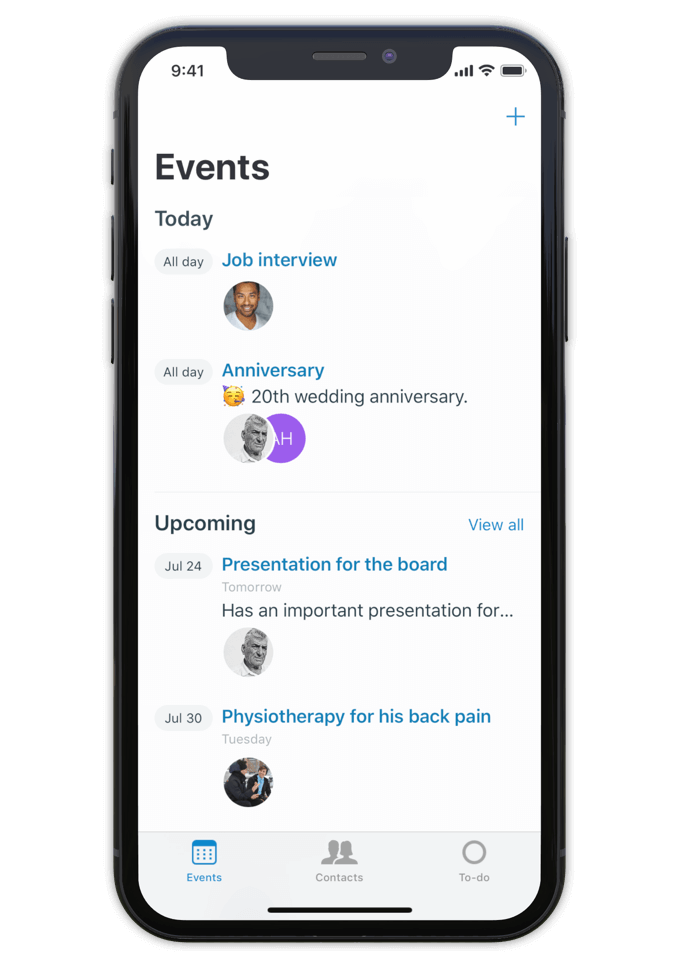
Hippo is a personal CRM for iPhone, iPad, and Mac. A personal CRM helps you keep track of the people in your life the way a sales CRM helps a salesperson track leads — but focused on the relationships that actually matter to you. Friends, family, mentors, colleagues, the people you want to stay close to.
Unlike most personal CRMs, Hippo stores everything on your device. There’s no account to sign up for, no server holding your contacts, and access to your iOS Contacts list is never required (it’s optional, and granted contacts still stay on-device). Optional sync runs through your own private iCloud Drive — never through Hippo.
Hippo is built for people who want to be more attentive without trading their privacy for the privilege.
Make notes, keep track of events and store to-dos for all your contacts.
So next time you meet, a quick glance at the person's profile in Hippo is all you need to remember the details.
Being attentive doesn’t have to be a challenge anymore.
Hippo is your personal reminder.

Use notes to quickly jot down things you learned about your contacts. Like names of kids, new jobs, a promotion, holiday plans, or gift ideas.
Create events for face to face meetings or important life events.
Get reminded when the event is happening so you can ask about it.
Remember the questions you want to ask the next time you meet.
Hippo is the personal CRM that doesn’t want your data.

Monica is a powerful open-source personal CRM, but it’s web-based and requires either a paid hosted plan or self-hosting your own server. Monica’s recent v5 update has shifted the product toward life journaling and modular vaults. If you want a focused personal CRM that runs natively on iPhone, iPad, and Mac with no setup, Hippo is the closer fit.
Dex is a strong choice if your relationships are heavily LinkedIn-driven and you want cross-platform sync via a Dex account. Hippo runs natively on Apple platforms (iPhone, iPad, and Mac) and is built around on-device privacy — your contact data never leaves your device unless you choose to sync via iCloud.
Clay enriches your contacts with public data from across the web. Hippo intentionally doesn’t do this. If you want enrichment, Clay is the right tool. If you want your data to stay local and untouched, Hippo is.
Hippo offers a one-time lifetime purchase option (uncommon in the category) and is the only one that works without ever requesting your iOS Contacts list.

Hi 👋, I’m Roel
I have been struggling with my memory all the time, at work and at home. I used to forget children’s names, someone's job, birthdays, anniversaries and other important life events. At work I couldn’t remember when or how a decision was made.
This made me insecure and unhappy. That is why I built Hippo.
With the Hippo app, I can remember all the important things about the persons I care for. A quick note usually does the job. It is simple and effective … and has changed my life! Hippo has helped me to become a better friend, partner and colleague.
Hippo is free to try for 1 month. After the trial, it’s $14.99 per year or $29.99 as a one-time lifetime purchase.
To view the pricing in your currency, see Hippo in the App Store.

Free to try for one month.
Huawei HiCar is a seamless "Human-Car-Home" interconnectivity solution that bridges the gap between your smartphone and your vehicle's infotainment system. Much like Android Auto or Apple CarPlay, it allows you to project apps, navigation, and media from your phone onto the car's dashboard. 百度百科 Core Features and Capabilities Deep Vehicle Control
: Beyond simple media projection, HiCar allows users to remotely control car hardware, such as adjusting air conditioning, locking doors, and opening windows directly from the phone. Distributed Technology
: Using Huawei’s HarmonyOS distributed soft bus technology, it enables "hardware resource sharing," such as using the car's 5G capability or cameras as an extension of the phone's hardware. Smart Interactions
: Features include AI voice assistant support (Celia), gesture control, and "Fusion Desktop" technology that makes phone apps feel like native car software. Seamless Navigation
: Users can search for a destination on their phone and have it immediately transfer to the car screen upon entry. 百度百科 Compatibility and Requirements Supported Devices Huawei flagship models like the series running EMUI 10+ or HarmonyOS 2.0+. Compatible Cars Over 20 automakers and 150+ models, including brands like (China models 2026+), Volkswagen (Magotan, Passat), Mercedes-Benz Connectivity
Supports wired (USB) and wireless (Bluetooth, NFC) connections. Is Huawei Phone Compatible with CHIGEE Display?
Huawei HiCar APK: Everything You Need to Know for Smart Driving
Huawei HiCar is a powerful human-car-home smart interconnection solution that mirrors your smartphone's features onto your vehicle's dashboard. Designed to compete with systems like Android Auto and Apple CarPlay, it offers deep hardware integration and a seamless ecosystem for users of Huawei devices. What is Huawei HiCar?
Unlike basic screen mirroring, the Huawei HiCar APK establishes a "pipeline" between your phone and car, allowing them to share hardware resources. For example, HiCar can use your car's built-in GPS for better accuracy or its external cameras to record your parking spot. Key Features Include:
Safety Interaction: A minimalist interface designed to reduce driver distraction.
Seamless Connection: Automatic recognition and connection once the initial pairing is done.
Remote Vehicle Control: Use your phone to adjust air conditioning, lock doors, or control windows.
Smart Home Integration: Activate an "Away Mode" when you drive that automatically turns off lights or AC at home.
Hardware Sharing: Combines phone computing power with car audio and display systems for a smoother experience. How to Download and Install the Huawei HiCar APK
For most Huawei users in China, HiCar is pre-installed. However, users of global models or those needing manual updates can follow these steps:
Here are a few post options for Huawei HiCar APK, tailored for different social platforms.
Option 1: Tech/Informational (Best for Facebook or Blog Intro)
Headline: Level Up Your Drive: Everything You Need to Know About Huawei HiCar 🚗💨
Sick of the standard infotainment system? Huawei HiCar is the ultimate smart travel solution, acting as a powerful alternative to Android Auto and Apple CarPlay. With over 150 vehicle models already supported, it seamlessly connects your smartphone to your car’s display for a truly integrated experience. Key Features:
Seamless Connection: Apps move from your phone to your car screen instantly.
Voice Control: Keep your hands on the wheel while navigating or playing music. Broad Compatibility: Supported by 20+ major OEMs.
Pro Tip: If you're using a non-Huawei device, you might need to install the HUAWEI AppGallery first to ensure you have the latest, most secure version of the APK. huawei hicar apk
#HuaweiHiCar #SmartCar #ConnectedDrive #TechTips #HuaweiAppGallery Option 2: Short & Punchy (Best for X/Twitter or Threads)
Looking for a smarter way to drive? 🚘 The Huawei HiCar APK is the perfect bridge between your phone and your car.
✅ Wireless connectivity✅ Voice-activated navigation✅ Seamless app integration
It’s already being tested in 150+ vehicles. Ready to upgrade your ride? Download it via the HUAWEI AppGallery for the best experience. 🛠️📱 #HiCar #Huawei #SmartTravel #CarTech Option 3: Visual/Casual (Best for Instagram) Caption:Your car just got a whole lot smarter. 🧠✨
Whether you’re commuting or road-tripping, Huawei HiCar brings your favorite apps right to your dashboard. No more fumbling with your phone—just pure, connected convenience.
How to get started:1️⃣ Download the latest HiCar APK.2️⃣ Connect via the HUAWEI AppGallery for official updates.3️⃣ Enjoy hands-free music, maps, and more! 🎶📍
Check the link in bio to see if your car is compatible! 🏎️👇
#Huawei #HiCar #AutoTech #FutureOfDriving #ConnectedCar #TechLife Useful Links for Your Post: Official App Source: HUAWEI AppGallery Developer Info: Huawei Developer Programs
AppGallery (app distribution platform) - HUAWEI Developer Programs
Bridging the Digital and the Drive: An Analysis of the Huawei HiCar Ecosystem
In the rapidly converging worlds of consumer electronics and automotive technology, the interface between the driver and the vehicle has become the new frontier of innovation. While Apple CarPlay and Android Auto have established themselves as the dominant global standards for phone-to-car projection, geopolitical and technological shifts have created space for new players. Enter Huawei HiCar, a solution that is often misunderstood as merely a competitor to Android Auto but is, in reality, a far more ambitious integration platform. To understand the significance of the "Huawei HiCar APK," one must look beyond the file itself and examine it as the linchpin of Huawei’s "Smart Cockpit" strategy—a bridge designed to seamlessly merge the smartphone experience with the automotive environment.
The Nature of the HiCar APK: More Than Just an App
At its most basic level, the term "HiCar APK" refers to the Android Package Kit file used to install the Huawei HiCar application on a smartphone. However, labeling HiCar as simply an "app" is a reductionist view. Unlike Android Auto, which is largely a projection interface that mirrors specific apps onto the car’s screen, HiCar functions as a distributed computing platform.
When a user installs the HiCar APK, they are not just installing a dashboard launcher; they are installing the client-side software required to integrate into Huawei’s "1+8+N" ecosystem strategy. In this paradigm, the smartphone is the central hub ("1"), the car is one of the eight key ancillary devices ("8"), and the connection facilitates a "N" network of IoT possibilities. The APK serves as the authentication and communication key, enabling the phone to recognize the vehicle not as a foreign Bluetooth device, but as an extension of the user’s digital identity.
Technical Architecture and Unique Features
The technical superiority of HiCar lies in its utilization of distributed technology. While traditional projection systems rely heavily on the car’s infotainment hardware to render visuals, HiCar utilizes a distributed soft bus architecture. This allows the hardware capabilities of the smartphone and the car to be shared. For example, the car’s microphone can be used by the phone for voice commands, or the phone’s processing power can be used to run navigation apps displayed on the car’s screen with lower latency.
This architecture enables features that traditional APK-based projection systems struggle to match.
The Ecosystem Wall: HarmonyOS vs. Android
A critical aspect of analyzing the HiCar APK is understanding its target demographic and compatibility. Originally developed during Huawei’s partnership with Google, the HiCar APK is designed for Android environments. However, following US trade sanctions, Huawei has pivoted to its own operating system, HarmonyOS.
Consequently, the HiCar APK is most effective when run on Huawei devices running HarmonyOS. While the APK can technically be side-loaded or installed on other Android devices, the deep-level system integration—which allows for the low-latency, distributed hardware sharing—is often neutered or unstable on non-Huawei hardware. This mirrors the "walled garden" strategy employed by Apple; just as CarPlay works best with an iPhone, HiCar is optimized for the Huawei ecosystem. This has created a bifurcated market: in China, where Huawei retains a massive market share, HiCar is a dominant force. Globally, where Huawei phones are less prevalent, the APK holds significantly less utility.
Market Implications and the "Smart Cockpit" Bridging the Digital and the Drive: An Analysis
The existence of the HiCar APK is a testament to Huawei’s transition from a hardware manufacturer to a software and solutions provider. Huawei has positioned itself not just as a phone maker, but as a tier-one automotive supplier. By embedding HiCar deeply into vehicle systems—partnering with automakers like Seres, BAIC, and Changan—Huawei ensures that its software becomes an indispensable part of the driving experience.
This strategy protects Huawei from hardware sanctions. Even if smartphone sales fluctuate, the ubiquity of the HiCar integration in Chinese electric vehicles (EVs) ensures a persistent user base. The APK becomes a gateway drug to the Huawei ecosystem; if a consumer buys a car with HiCar integration, the friction of switching to a Huawei phone decreases significantly because the connectivity experience is superior to that of competitors.
Security and Privacy Considerations
From a security standpoint, the HiCar APK represents a massive data pipeline. By connecting the phone, the car, and the smart home, Huawei aggregates a significant amount of user data. The APK manages sensitive authentication tokens and location data. While Huawei touts its security protocols, the deep integration raises questions about data privacy, particularly regarding how driving data is stored and utilized within the Huawei cloud ecosystem. For privacy-conscious users, the depth of the integration is a double-edged sword: it offers unparalleled convenience but requires a high degree of trust in the software provider.
Conclusion
The Huawei HiCar APK is a deceptive piece of software. To the casual observer, it may appear as a simple clone of Android Auto or Apple CarPlay. However, a deeper analysis reveals it to be the client-side interface of a sophisticated distributed operating system. It represents a shift from "projection" to "integration," where the car and phone operate as a single cohesive unit rather than two connected devices.
While its global impact is currently limited by the geopolitical landscape surrounding Huawei, within its primary market, the HiCar APK is a strategic masterpiece. It locks users into an ecosystem, enhances the value of Huawei hardware, and redefines the relationship between the driver, the device, and the road. As the automotive industry continues its shift toward software-defined vehicles, HiCar stands as a prime example of how tech giants are moving from the pocket to the dashboard.
Huawei HiCar is a smartphone-to-vehicle connectivity platform—similar to Apple CarPlay or Android Auto—that creates a seamless link between a Huawei mobile device and a car’s infotainment system. Core Functionality
The system transforms the vehicle's dashboard into an extension of the smartphone, providing a "Full-scenario Smart Interconnection".
Seamless Connection: When you enter the vehicle, the phone can connect automatically via wireless or wired (USB) methods without needing manual activation.
Navigation & Maps: Supports high-definition map services like Baidu Maps and AutoNavi. A unique "shake-to-share" feature allows you to transfer a route from your phone to the car screen simply by shaking the device.
Smart Home Control: Directly from the car's display, you can remotely manage connected smart home devices, such as adjusting home ventilation or air conditioning. Safety Features:
Fatigue Monitoring: Uses AI via an in-car camera or wearable heart rate sensors to detect abnormal driver behavior and signs of tiredness.
Road Safety Reminders: Provides proactive alerts to help ensure safer driving. Advanced Interaction Technologies
HiCar leverages Huawei's distributed technology to share hardware and software resources between the phone and the car. Huawei HiCar - First Look - Android Auto Competitor?
HUAWEI HiCar is a smart interconnection solution that mirrors your smartphone's functions—such as navigation, music, and voice calls—onto your vehicle's infotainment screen. It is widely considered Huawei's alternative to Android Auto and Apple CarPlay. Key Features of HUAWEI HiCar
Seamless Integration: Automatically connects your phone to the car upon entry, allowing you to continue navigation or music from where you left off.
Application Sharing: Provides access to a wide range of mobile apps, including maps (AutoNavi, Baidu), music (QQ Music), and messaging.
Voice Control: Features Celia AI, which supports multiple commands in one sentence, such as "Play music and navigate home".
Smart Home Control: Allows you to remotely manage smart home devices (AC, lights, door locks) directly from the car's dashboard.
Safety Monitoring: Some versions support driver fatigue monitoring and gesture recognition for managing calls or volume. Installation and Compatibility Seamless Handover: HiCar allows for "task migration
Huawei HiCar is Huawei’s smart car connectivity solution, serving as an alternative to Apple CarPlay Android Auto
. It allows you to project your smartphone apps, navigation, and music onto your car's dashboard display for a safer, more integrated driving experience. 🚗 Key Features of HiCar Deep Integration
: Unlike standard screen mirroring, HiCar utilizes the phone's (AI processor) to enable features like facial recognition gesture control via in-car cameras. Safety Tools : Includes driver fatigue detection , lane departure warnings, and real-time hazard alerts. Smart Home Control
: You can control IoT devices in your home (like turning on the AC or lights) directly from your car's screen. Low Latency : Built on Huawei’s distributed technology
, it provides a near-instant connection with ultra-low power consumption. HUAWEI Developer Forum HiCare for Android - Download the APK from Uptodown
Huawei HiCar is a smartphone-to-vehicle interconnection system developed as a robust alternative to Android Auto and Apple CarPlay . Built using Huawei's Distributed Soft Bus Technology
, it allows for seamless integration between a Huawei smartphone (running HarmonyOS or EMUI) and a car's infotainment system. Core Features & Functionality
HiCar goes beyond simple screen mirroring by creating a "system-level integration" that shares hardware resources between the phone and the car. Seamless Continuity:
Navigation started on your phone automatically transfers to the car's screen the moment you enter the vehicle. Intelligent Controls:
Supports remote control of car hardware, including air conditioning, windows, and door locks directly from the phone. AI & Safety:
Includes fatigue driving monitoring via interior cameras and heart rate sensors, as well as gesture recognition for hands-free volume and call management. App Ecosystem:
Integrates mobile apps like AutoNavi, Baidu Maps, and various music streaming services into a car-friendly UI. Software & APK Requirements
For the system to function, the "HiCar" app must be installed on the smartphone. Compatibility: Officially, it requires a Huawei device running HarmonyOS 4.0 – 4.3 EMUI 11.0+ Official Downloads: Users can download or update the app directly via the Huawei AppGallery by searching for "HiCar". Third-Party APKs:
While APKs are available on third-party sites, they often require specific companion apps like
to work on certain car models or to enable unofficial app support (e.g., YouTube or custom navigation). Hardware Options
If your vehicle does not have built-in HiCar support, there are two primary hardware solutions: Huawei HiCar - First Look - Android Auto Competitor?
HUAWEI HiCar (Huawei Intelligent Car Connectivity) is a middleware platform that creates a symbiotic connection between a smartphone and a vehicle’s head unit. Unlike simple Bluetooth pairing or screen mirroring, HiCar provides:
The APK is the client-side software installed on the phone. The vehicle must have HiCar built-in (or supported via an aftermarket dongle).
Before you download any APK from the internet, understand the risks. The official HiCar app is not available on the Google Play Store because it relies on Huawei Mobile Services (HMS).
✅ Official Sources (Ranked)
❌ Avoid
Checksum Verification: After downloading, compare the SHA-256 hash with values posted on official Huawei developer channels.
Yes, if your car’s head unit runs a compatible version of Linux/QNX. Many 2021+ VW, BMW, and Volvo models support both. You may need to toggle between projection standards in the car’s settings.
Wren Forum. All rights reserved. © 2026